

Process table in Analytics
Process tables are automatically generated within the Kissflow Analytics for every process you create in your Kissflow account.
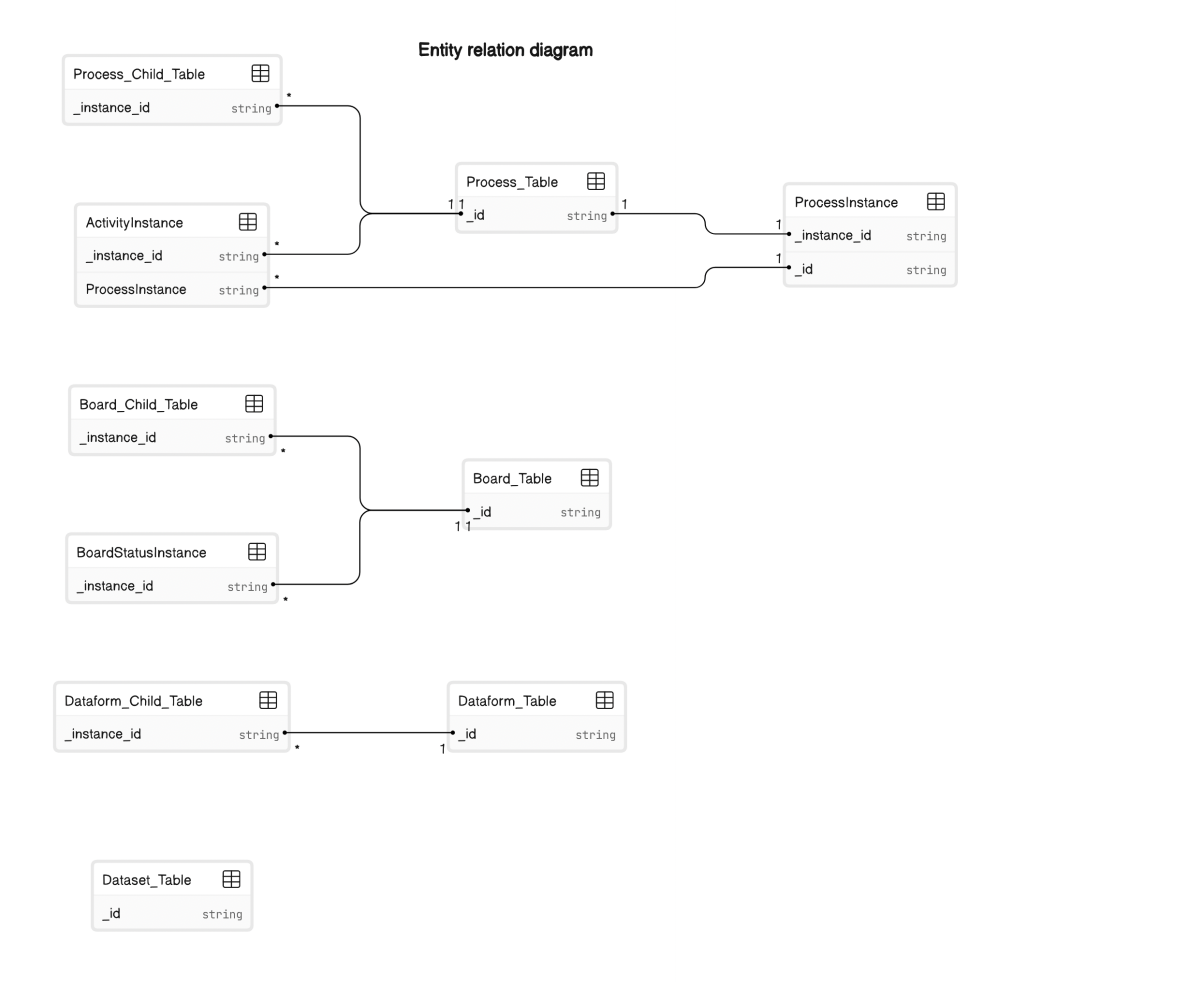
Process tables are automatically generated within the Kissflow Analytics for every process you create in your Kissflow account. Each process is represented as a table, encompassing both system and custom fields associated with the process. The following analytics diagram showcasing the entity relationship of the data sources can be used for reference.
System fields and custom fields
All form and system fields associated with the process are available as columns in the process table. Access to these fields allows analyzing and reporting on various use cases. System fields can be easily identified in the query editor for dataview creation using the '_' (underscore) symbol as a prefix. Custom fields are recognizable as they don’t begin with an underscore but may have underscores within the field name.
| Field ID | Field name | Data type | Description |
|---|---|---|---|
| _id | ID | String | The unique ID of the item. |
| Name | Name | String | The name configured by the user for an item under the process's General settings. |
| _created_by | Created by | JSON | This field stores information about the user who initially created the item. |
| _created_by.Kind | Created by | JSON | A subfield of "_created_by" always contains the value "User," indicating that a user created the item. |
| _created_by.Name | Created by | JSON | Another subfield of "_created_by" that displays the name of the user who created the item in a format that includes both the first and last name of the user. |
| _created_by._id | Created by | JSON | The unique ID of the user who created the item. |
| _modified_by | Modified by | JSON | This field stores information about the user who last modified the item. |
| _modified_by.Kind | Modified by | JSON | A subfield of "_modified_by" always contains the value "User," indicating that a user modified the item. |
| _modified_by.Name | Modified by | JSON | Another subfield of "_modified_by" displays the name of the user who last modified the item in a format that includes both the first and last name of the user. |
| _modified_by._id | Modified by | JSON | The unique ID of the user who last modified the item. |
| _created_at.display_value | Created at | DateTime | This represents the date and time of the item’s creation in the process. The timestamp format is GMT-based. |
| _created_at.timedelta | Created at | DateTime | This field holds the time zone offset duration between Greenwich Mean Time (GMT) and a specific timezone. In this case, it always remains empty as no such difference exists. |
| _created_at.timezone | Created at | DateTime | This indicates the timezone of ‘Created at’ which is always GMT for the system field. |
| _created_at.value | Created at | DateTime | This field displays the date and time the item was initially created. The timestamp format is GMT-based. |
| _modified_at.display_value | Modified at | DateTime | This represents the date and time of the item’s last modification in GMT format in the process table. |
| _modified_at.timedelta | Modified at | DateTime | This field holds the time zone offset duration between Greenwich Mean Time (GMT) and the specific timezone. It remains empty when no such difference exists. |
| _modified_at.timezone | Modified at | DateTime | This indicates the timezone in GMT format at which the item was last modified. |
| _modified_at.value | Modified at | DateTime | This field displays the date and time when the item was last modified. The timestamp format is GMT-based. |
| _flow_name | Flow name | String | This is the name of the process to which the item belongs. |
| _current_step | Current step | String | The name of the current workflow step where the item is placed. |
| _current_assigned_to | Currently assigned to | JSON List | A list of user(s) to whom the step is currently assigned. |
| _completed_at.display_value | Completed at | DateTime | This represents the date and time of the item’s completion time in GMT format in the process table. |
| _completed_at.timedelta | Completed at | DateTime | This field holds the time zone offset duration between Greenwich Mean Time (GMT) and the specific timezone. It remains empty when no such difference exists. |
| _completed_at.timezone | Completed at | DateTime | This indicates the timezone in GMT format when the item was completed. |
| _completed_at.value | Completed at | DateTime | This field displays the date and time when the item was completed. The timestamp format is GMT-based. |
| _status | Status | String | The current status of the item such as InProgress, Withdrawn, Rejected, or Completed. |
| _stage | Stage | Number | A numerical value that denotes the item status. Following are the values representing the item status.1-InProgress, 2-Completed, 3-Skipped, 4-Rejected, 5-Sendback, 6- Withdrawn, 7-Stopped, 8-SendbackToInitiator. |
| _restart_info | Restart info | JSON | The date and time when the item was restarted. |
| _root_process_instance | RootProcessInstance | String | The root process instance is the main branch of the original process. Any parallel branches that come from it will have their "parent process instance" as the main process, which could be the root or another parallel branch if nested. |
| _submitted_at.display_value | Submitted at | DateTime | This represents the date and time of the item’s submission time in GMT format in the process table. |
| _submitted_at.timedelta | Submitted at | DateTime | This field holds the time zone offset duration between Greenwich Mean Time (GMT) and the specific timezone. It remains empty when no such difference exists. |
| _submitted_at.timezone | Submitted at | DateTime | This indicates the timezone in GMT format when the item was submitted. |
| _submitted_at.value | Submitted at | DateTime | This field displays the date and time when the item was submitted. The timestamp format is GMT-based. |
| _request_number | Request number | Number | A sequential count of all the submitted items. |
| _is_public_form | Is Public Form | Boolean | A boolean value that indicates whether the item was created from a public form. For instance, this field is TRUE when the item is created from a public form. |
| _counter | Counter | Number | A sequential count of all the items, including drafts in a process. |
| _last_completed_step | Last completed step | String | It is the activity instance ID of the previous workflow step. |
| _progress | Progress | Number | A percentage value that indicates the progress of an item in a workflow. |
| _source_instance | SourceInstance | String | The ID of the source item from which the current item is duplicated. |
Child table
If the process has child tables, each child table will be created separately within the analytics module. The system automatically generates these tables in analytics upon creating the process in your Kissflow account. These tables are automatically generated and named in "ProcessName-ChildTableName" format. For instance, a process called Purchase Request will have a child table named Purchase Request Catalog Items table, where Catalog items will be the child's name created in the Purchase Request process.
System fields of the child table
| Field ID | Field name | Data type | Description |
|---|---|---|---|
| _id | ID | String | The unique ID of the child table. |
| Name | Name | String | The name of the child table. |
| _created_by | Created by | JSON | This field stores information about the user who initially created the item. |
| _created_by.Kind | Created by | JSON | A subfield of "_created_by" always contains the value "User," indicating that a user created the item. |
| _created_by.Name | Created by | JSON | Another subfield of "_created_by" displays the name of the user who created the item in a format that includes both the first and last name of the user. |
| _created_by._id | Created by | JSON | The unique ID of the user who created the item. |
| _modified_by | Modified by | JSON | This field stores information about the user who last modified the item. |
| _modified_by.Kind | Modified by | JSON | A subfield of "_modified_by" that contains the value "User," indicating that a user modified the item. |
| _modified_by.Name | Modified by | JSON | Another subfield of "_modified_by" displays the name of the user who last modified the item in a format that includes both the first and last name of the user. |
| _modified_by._id | Modified by | JSON | The unique ID of the user who last modified the item. |
| _created_at.display_value | Created at | DateTime | This represents the date and time of the item’s creation in GMT format in the process table. |
| _created_at.timedelta | Created at | DateTime | This field holds the time zone offset duration between Greenwich Mean Time (GMT) and the specific timezone. It remains empty when no such difference exists. |
| _created_at.timezone | Created at | DateTime | This indicates the timezone in GMT format at which the item was created. |
| _created_at.value | Created at | DateTime | This field displays the date and time the item was initially created. The timestamp format is GMT-based. |
| _modified_at.display_value | Modified at | DateTime | This represents the date and time of the item’s last modification in GMT format in the process table. |
| _modified_at.timedelta | Modified at | DateTime | This field holds the time zone offset duration between Greenwich Mean Time (GMT) and the specific timezone. It remains empty when no such difference exists. |
| _modified_at.timezone | Modified at | DateTime | This indicates the timezone in GMT format at which the item was last modified. |
| _modified_at.value | Modified at | DateTime | This field displays the date and time when the item was last modified. The timestamp format is GMT-based. |
| _flow_name | Flow name | String | The name of the process. |
System tables
Process tables in Analytics consist of two system tables: ProcessInstance and ActivityInstance. Each table contains specific system fields that provide the current status and workflow activity history of all items in all the processes.
You can find the system table inside the Data explorer tab. You can also filter the data sources based on System tables to identify the tables quickly. You can use the system fields of the system tables to generate tabular, chart, and pivot reports.
ProcessInstance table
The process instance table displays the current status of each item across all processes in your Kissflow account. In simple words, each process item is shown in individual rows in the table. If a process has parallel branches, the Parentprocessinstance column will contain the ID towards the respective item to indicate that.
| Field ID | Field Name | Data type | Description |
|---|---|---|---|
| _id | ID | String | The ID of the process instance. |
| _created_by | Created by | User | This field stores information about the user who initially created the item. |
| _created_by.Kind | Created by | String | A subfield of "_created_by" that contains the value "User," indicating that a user created the item. |
| _created_by.Name | Created by | String | Another subfield of "_created_by" displays the name of the user who created the item in a format that includes both the first and last name of the user. |
| _created_by._id | Created by | String | This subfield contains the unique identifier (ID) associated with the user who created the item. |
| _modified_by | Modified by | User | This field stores information about the user who last modified the item. |
| _modified_by.Kind | Modified by | String | A subfield of "_modified_by" always contains the value "User," indicating that a user modified the item. |
| _modified_by.Name | Modified by | String | Another subfield of "_modified_by" displays the name of the user who last modified the item in a format that includes both the first and last name of the user. |
| _modified_by._id | Modified by | String | The unique ID of the user who last modified the item. |
| _created_at.display_value | Created at | String | This represents the date and time of the item’s creation in GMT format in the process table. |
| _created_at.timedelta | Created at | String | This field holds the time zone offset duration between Greenwich Mean Time (GMT) and the specific timezone. It remains empty when no such difference exists. |
| _created_at.timezone | Created at | String | This indicates the timezone in GMT format at which the item was created. |
| _created_at.value | Created at | DateTime | This field displays the date and time the item was initially created. The timestamp format is GMT-based. |
| _modified_at.display_value | Modified at | String | This represents the date and time of the item’s last modification in GMT format in the process table. |
| _modified_at.timedelta | Modified at | String | This field holds the time zone offset duration between Greenwich Mean Time (GMT) and the specific timezone. It remains empty when no such difference exists. |
| _modified_at.timezone | Modified at | String | This indicates the timezone in GMT format at which the item was last modified. |
| _modified_at.value | Modified at | DateTime | This field displays the date and time when the item was last modified. The timestamp format is GMT-based. |
| _flow_name | Flow name | String | The name of the process. |
| ParentProcessInstance | ParentProcessInstance | String | The ID of the process instance when the process workflow contains parallel branches. This field will be empty without parallel branches in the workflow. |
| _root_process_instance | RootProcessInstance | String | The root process instance is the main branch of the original process. Any parallel branches that come from it will have their "parent process instance" as the main process, which could be the root or another parallel branch if nested. |
| CurrentActivityInstance | CurrentActivityInstance | String | The current step’s activity instance of the item in a process. |
| CurrentActivityDef | CurrentActivityDef | String | The ID of the current activity logged in the ActivityInstance table. |
| PreviousActivityInstance | PreviousActivityInstance | String | The ID of the previous activity instance of the item logged in the ActivityInstance table. |
| ParentActivityInstance | ParentActivityInstance | String | The ID of the original activity instance logged in the ActivityInstance table when the workflow step contains multiple branches. It will be the first parallel branch of a process. |
| StartActivityInstance | StartActivityInstance | String | The ID of the activity instance logged in the ActivityInstance table when the item’s workflow got started. Each branch will have its activity instance when the branch initiates the action. |
| AssignedTo | AssignedTo | UserAndGroupList | The name of the user(s) to whom the current step is assigned. |
| AssignedAt.display_value | AssignedAt | String | This represents the date and time in GMT format when the item was assigned in the process table. |
| AssignedAt.timedelta | AssignedAt | String | This field holds the time zone offset duration between Greenwich Mean Time (GMT) and the specific timezone. It remains empty when no such difference exists. |
| AssignedAt.timezone | AssignedAt | String | This indicates the timezone in GMT format when the item was assigned in the process table. |
| AssignedAt.value | AssignedAt | DateTime | This field displays the date and time when the item was assigned. The timestamp format is GMT-based. |
| ExpectedAt.display_value | Expected At | String | This represents the date and time in GMT format at which the item is expected to be completed in the process table. |
| ExpectedAt.timedelta | Expected At | String | This field holds the time zone offset duration between Greenwich Mean Time (GMT) and the specific timezone. It remains empty when no such difference exists. |
| ExpectedAt.timezone | Expected At | String | This indicates the timezone in GMT format when the item is expected to be completed in the process table. |
| ExpectedAt.value | Expected At | DateTime | This field displays the date and time when the item is expected to be completed. The timestamp format is GMT-based. |
| AssignmentType | AssignmentType | String | The type of step assignment for approval. The assignment type will have one of the following values: Default, Round robin, or Least loaded. |
| WorkflowModelId | WorkflowModelId | String | The unique id of a process table to which the item belongs (e.g., Purchase_Request). |
| ContextProcessDef | ContextProcessDef | String | The ContextProcessDef field in analytics serves as an identifier for processes. It consists of a parent and child process with distinct IDs. For example, in a scenario where P1 is the parent process and P1.Child1 as well as P1.Child2 are child processes; their association is established through the parent table ID. Additionally, in cases of parallel branches, child processes can transition into becoming parents themselves. |
| _status | Status | String | The status of the process step. The status can be InProgress, Completed, Rejected, Withdrawn, or SendBack |
| _stage | Stage | Number | A numerical value that denotes the item status: 1-InProgress, 2-Completed, 3-Skipped, 4-Rejected, 5-Sendback, 6- Withdrawn, 7-Stopped, 8-SendbackToInitiator. |
| PreviousStep | PreviousStep | String | The id of the step from which the item is being moved in a process instance. |
| ActedBy | ActedBy | Json list | A list of user(s) who acted on the process item. |
| Note | Note | String | A note is sent to the user when an item is sent back or reassigned. |
| StoppedFor | StoppedFor | String | The step ID of the item that has been stopped in the process. |
| _model_id | Text | Model ID | The unique ID of the process. |
| _instance_id | Text | Instance ID | Instance ID is the unique ID of an item on a process table. Every instance of the item generates a new record with this unique ID. |
ActivityInstance table
It displays the entire step history of each item across all the processes in your Kissflow account.
| Field ID | Field name | Data type | Description |
|---|---|---|---|
| _id | ID | Text | The unique ID of the activity instance. |
| _created_by | Created by | JSON | This field stores information about the user who initially created the item. |
| _created_by.Kind | Created by | JSON | A subfield of "_created_by" always contains the value "User," indicating that a user created the item. |
| _created_by.Name | Created by | JSON | Another subfield of "_created_by" displays the name of the user who created the item in a format that includes both the first and last name of the user. |
| _created_by._id | Created by | JSON | The unique ID of the user who created the item. |
| _modified_by | Modified by | JSON | This field stores information about the user who last modified the item. |
| _modified_by.Kind | Modified by | JSON | A subfield of "_modified_by" always contains the value "User," indicating that a user modified the item. |
| _modified_by.Name | Modified by | JSON | Another subfield of "_modified_by" displays the name of the user who last modified the item in a format that includes both the first and last name of the user. |
| _modified_by._id | Modified by | JSON | The unique ID of the user who last modified the item. |
| _created_at.display_value | Created at | DateTime | This indicates the date and time when the activity occurred for the item, presented in GMT format within the process table. |
| _created_at.timedelta | Created at | DateTime | This field holds the time zone offset duration between Greenwich Mean Time (GMT) and the specific timezone. It remains empty when no such difference exists. |
| _created_at.timezone | Created at | DateTime | This denotes the timezone that is stored in GMT at which the activity occurred for the item. |
| _created_at.value | Created at | DateTime | This field displays the date and time when the activity occurred for the item. The timestamp format is GMT-based. |
| _modified_at.display_value | Modified at | DateTime | This represents the date and time of the item's last modification activity of timestamp stored in GMT format in the process table. |
| _modified_at.timedelta | Modified at | DateTime | This field holds the time zone offset duration between Greenwich Mean Time (GMT) and the specific timezone. It remains empty when no such difference exists. |
| _modified_at.timezone | Modified at | DateTime | This indicates the timezone that is stored in GMT format at which the item's last modification activity occurred. |
| _modified_at.value | Modified at | DateTime | This field displays the date and time when the item's last modification activity occurred. The timestamp is stored in GMT format. |
| _flow_name | Flow name | String | The name of the process. |
| PreviousActivityInstance | PreviousActivityInstance | String | The ID of the previous activity instance. |
| NextActivityInstance | NextActivityInstance | String | The ID of the following activity instance. |
| ActivityDef | ActivityDef | String | The unique ID of the process step. |
| ParentActivityInstance | ParentActivityInstance | String | The ID of the parent activity instance when the workflow step contains multiple branches. |
| ProcessInstance | ProcessInstance | String | This will contain the respective process instance ID. |
| RootProcess | RootProcess | String | This will contain the root process instance ID. |
| NodeType | NodeType | String | The type of process steps such as StartEvent, UserTask, and EndEvent. |
| ScriptName | ScriptName | String | The name of the workflow step in a process. |
| ActedBy | ActedBy | JSON array | A user who has approved the process item. In the case of a parallel branch, it will be a list of users who have approved the item. |
| ActedAt.display_value | Acted at | DateTime | This represents the date and time at which the item was acted upon in GMT format in the process table. |
| ActedAt.timedelta | Acted at | DateTime | This field holds the time zone offset duration between Greenwich Mean Time (GMT) and the specific timezone. It remains empty when no such difference exists. |
| ActedAt.timezone | Acted at | DateTime | This indicates the timezone stored in GMT format at which the item was acted upon. |
| ActedAt.value | Acted at | DateTime | This field displays the date and time when the item was acted upon. The timestamp format is stored as GMT. |
| ExpectedAt.display_value | Expected at | DateTime | This represents the date and time in GMT format at which the item is expected to complete in the process table. |
| ExpectedAt.timedelta | Expected at | DateTime | This field holds the time zone offset duration between Greenwich Mean Time (GMT) and the specific timezone. It remains empty when no such difference exists. |
| ExpectedAt.timezone | Expected at | DateTime | This indicates the timezone stored in GMT format when the item is expected to complete in the process table. |
| ExpectedAt.value | Expected at | DateTime | This field displays the date and time when the item is expected to complete. The timestamp format is GMT. |
| AssignedAt.display_value | AssignedAt | DateTime | This represents the date and time in timestamp stored in GMT format when the activity occurred for the item in the process table. |
| AssignedAt.timedelta | AssignedAt | DateTime | This field holds the time zone offset duration between Greenwich Mean Time (GMT) and the specific timezone. It remains empty when no such difference exists. |
| AssignedAt.timezone | AssignedAt | DateTime | This indicates the timezone in GMT format when the activity occured for the item in the process table. |
| AssignedAt.value | AssignedAt | DateTime | This field displays the date and time when the activity occurred for the item. The timestamp format is stored in GMT. |
| DelegatedTo | DelegatedTo | JSON | The user to whom the item is delegated. |
| ActualAssignedTo | ActualAssignedTo | JSON array | The user who is first assigned to approve the process step of an item. |
| MinRequiredApproval | Min Approval | Number | The minimum number of approvals required to proceed to the next step. |
| ApproverUnit | Approver Unit | String | This field is used to determine the criteria for approval within workflows. It specifies whether the condition involves a fixed number of approvers, such as 10 individuals, or a percentage of the total assignees. For instance, if the condition is "10 percent of total assignees," the field captures the assessment unit for approval requirements in various workflow steps. |
| AssignedTo | AssignedTo | JSON array | The current list of user(s)assigned to approve the process step. |
| IsSLABreached | SLA Breached | Boolean | A boolean value that indicates whether the SLA is breached for a step. For instance, if the value is true, the SLA is crossed. |
| SendBackOut | SendBackOut | String | This field defines when an item moves from Step 2 to Step 1. |
| SendBackIn | SendBackIn | String | This field defines when an item moves from Step 1 to Step 2. |
| MoveToType | MoveToType | String | The field shows when an item is moved to either one of the steps: Go to or Sent back. |
| _status | Status | String | The status of the process step. The status can be InProgress, Completed, Rejected, Withdrawn, or SendBack. |
| _stage | Stage | Number | A numerical value that denotes the item status: 1-InProgress, 2-Completed, 3-Skipped, 4-Rejected, 5-Sendback, 6- Withdrawn, 7-Stopped, 8-SendbackToInitiator. |
| ActualTimeTaken | ActualTimeTaken | Number | The total time taken to approve a request. This value will be displayed in seconds. |
| PreviousStep | Previous step | String | The id of the step from which the item is moved in an activity instance. |
| ReassignList | ReassignList | JSON | A list of user(s) to whom the step has been reassigned. |
| LastSelfPickedAt.display_value | LastSelfPickedAt | DateTime | This represents the date and time in GMT format when the item was last self-picked. |
| LastSelfPickedAt.timedelta | LastSelfPickedAt | DateTime | This field holds the time zone offset duration between Greenwich Mean Time (GMT) and the specific timezone. It remains empty when no such difference exists. |
| LastSelfPickedAt.timezone | LastSelfPickedAt | DateTime | Indicates the time zone in which the self-pick event occurred. |
| LastSelfPickedAt.value | LastSelfPickedAt | DateTime | This indicates the timezone in GMT format when the item was last self-picked. |
| LastSelfPickedBy | LastSelfPickedBy | JSON | This field stores information about the user responsible for the last self-pick action. |
| LastSelfPickedBy.Kind | LastSelfPickedBy | JSON | A subfield of "LastSelfPickedBy" always contains the value "User," indicating that a user is responsible for the last self-pick (e.g., User) |
| LastSelfPickedBy(Name) | LastSelfPickedBy | JSON | A subfield of "LastSelfPickedBy"displays the name of the user that performed the last self-pick action in a format that includes both the first and last name of the user. |
| LastSelfPickedBy._id | LastSelfPickedBy | JSON | The unique ID of the user who is responsible for the last self-pick. |
| SelfPickedList | SelfPickedList | JSONList | The list of users who have last self picked the item in a process. |
| Note | Note | String | A note that is sent to the user when an item is sent back or reassigned. |
| AssignmentRule | AssignmentRule | String | The type of step assignment for approval. The assignment type will have one of the following values: Default, Round robin, or Least loaded. |
| DelegatedFrom | DelegatedFrom | JSON | The ID of the user from whom the request was delegated. |
| StoppedFor | StoppedFor | String | The step ID of the item that has been stopped in the process. |
| _model_id | Text | Model ID | The unique ID of the process. |
| _instance_id | Text | Instance ID | Instance ID is the unique ID of an item on a process table. Every instance of the item generates a new record with this unique ID. |