

Exporting user data
Super Admins, IAM Admins, and User Admins, can export the details of some or all the users in a Kissflow account.
Super Admins, IAM Admins, and User Admins, can export the details of some or all the users in a Kissflow account.
Exporting user data
To export your user data, follow the steps below:
Sign in to Kissflow. Click your profile picture > Account administration > User management.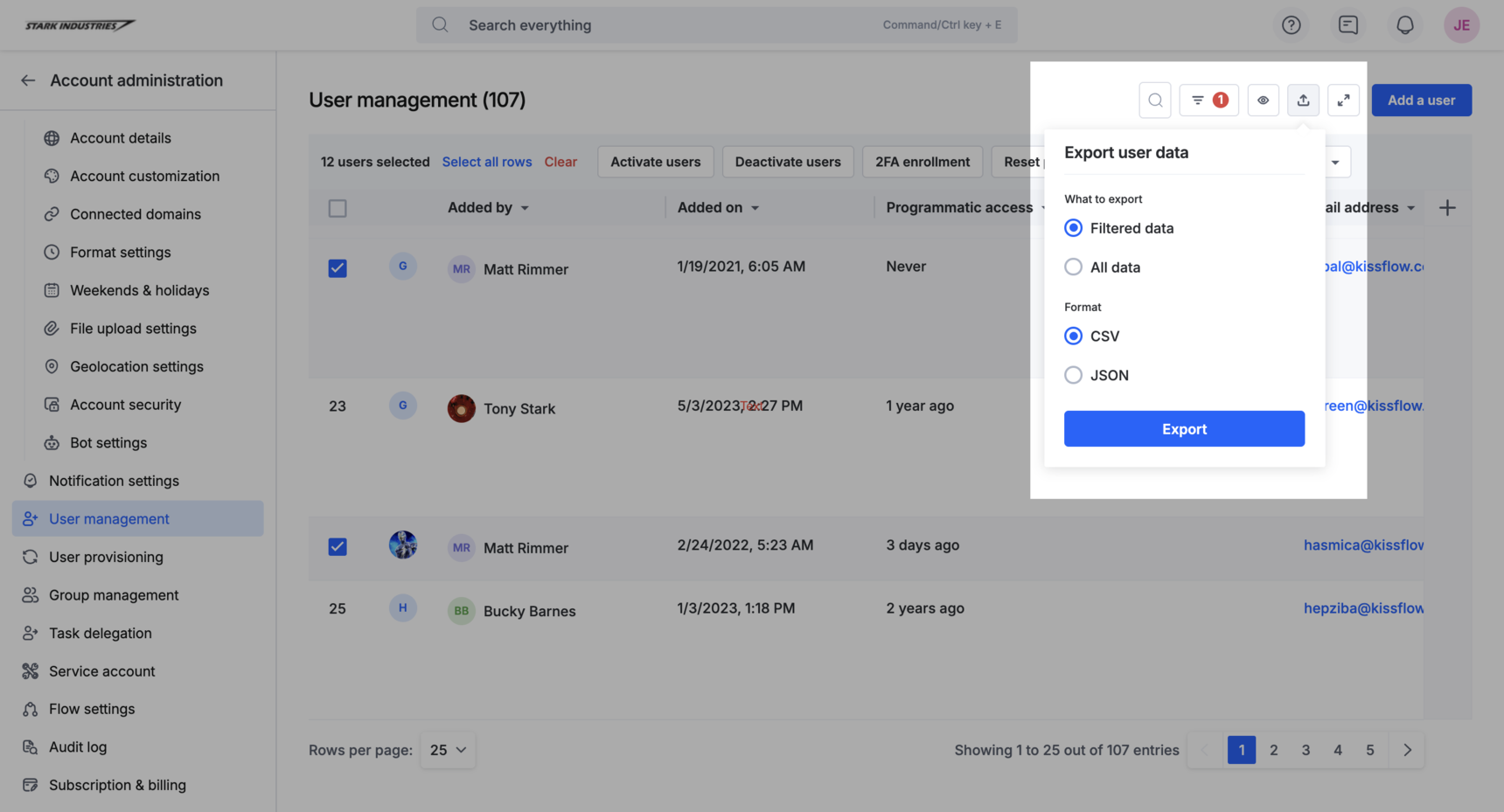 2. Click the Export user data button (
 ) in your user management table.
3. Select the appropriate radio button in the drop-down to export the required user data.
) in your user management table.
3. Select the appropriate radio button in the drop-down to export the required user data.
-
Filtered data: Exports the details of only the filtered user records.
-
All data: Exports the details of all the users in your Kissflow account.
Note:
When you select Filtered data, all the data fields hidden from your page are
filtered out, only visible data is available in your exported file.
- Select the file type as CSV or JSON. Click Export.
When you click Export, you’ll receive an email with a link to download the exported file. Alternatively, you can download your exported file by accessing the relevant notification card.
Note
If you use the Show/hide fields button to hide any fields, you would only be able to export the current page and not all the data.
Interpreting the exported CSV file
You can look at the embedded CSV file below to understand the structure of the exported file. :
| Field name | Description | Example |
|---|---|---|
| id | The universally unique ID of a user | Us245453489Zs |
| First name | The user’s first name | John |
| Last name | The user’s last name | Doe |
| Email address | The user’s email address | johndoe@kissflow.com |
| Email verified | Whether the user’s email address was verified or not TRUE FALSE | TRUE |
| Created by (Name) | The name of the user who created this user | Adam |
| Created by (id) | The unique ID of the user who created this user | A34343jvbSs |
| Created by (Kind) | The user role of the user who created this user | Super Admin |
| Created at | The date & time at which the user’s account was created inside Kissflow | 2022-07-01 06:15 |
| Groups | The groups this user is a part of inside Kissflow | Marketing |
| Nickname | The user’s nickname | JD |
| User type | The user role assigned to this user based on their responsibilities User User Admin Super Admin Billing Admin IAM Admin App Store Admin | Super Admin |
| Status | The current status of the user Active Inactive | Active |
| Last logged in | The date & time the user last signed into Kissflow | 2022-07-01, 09:30 |
| Added on | The date and the time the user was added to this Kissflow account | 30/06/2022, 13:45 |
| Manager | The name of the user’s manager | Adam |
| Last access | The date & time and through which device and browser the user used to access Kissflow | 1 day ago |
| Programmatic access | Never |
Example of exported user data: Exported CSV
Exported user data in JSON format
If you export your user data in JSON format, here's how your data will look like:
Note
{"_id": "Us5ZfNDf2USt","FirstName": "Bruce","Email": "admin@kissflow.com","Groups": "Sales and Marketing","UserType": "Super Admin","Status": "Active","_created_at": "2022-08-18T12:48:05Z","EmailVerified": false,"LastLoggedInAt": NaN,"_last_access": NaN,"_created_by._id": "Us5ZfJ1Q7GSo","_created_by.Name": "Frank","_created_by.Kind": "User","Manager._id": "Us5ZfK1Dad4i","Manager.Name": "Justin","Manager.Kind": "User","Manager.Email": "superadmin@kissflow.com"}
If you add any custom field to the user management table and export it, the exported data will have the data type of the custom field.
| Text | String |
| Text area | String |
| Number | Number |
| Currency | String |
| Date | String |
| Date&Time | String |
| Yes/No | String (true/false) |
| Attachment | List of dicts of file name, file id, and key |
| Dropdown | String |
| User - single | Dict of name, id, and kind |
| User - multi | List of dict of name, id, and kind |
| Signature | Dict of key and name of the signature file in S3 |