

System tables in Analytics
The system table is a table that contains specific details of all the workload information across Kissflow.
The system table is a table that contains specific details of all the workload information across Kissflow. There are two system tables for processes called ProcessInstance and ActivityInstance that have the current status and workflow activity history of all the items in all processes. Boards also have a system table called Board Workload Instance which contains the workload information across all boards.
The following diagram about the entity relationship of the data sources helps in understanding about the structure of Analytics tables.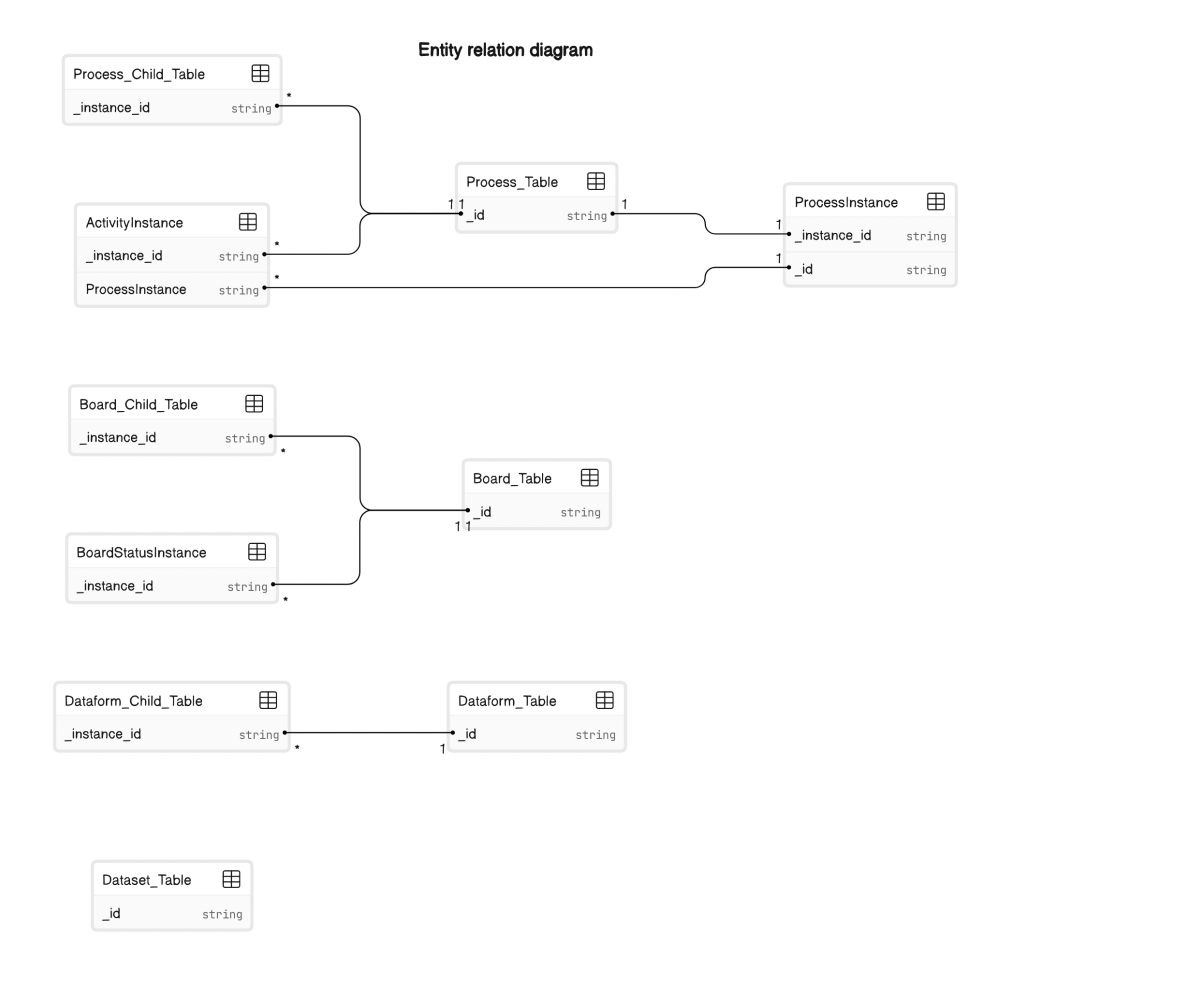 Similarly, there are two system tables exclusively for user and group related information in your Kissflow account. These tables provide you a detailed view of the actions performed by users added in your account.
You can find the system table inside the Data explorer tab. You can also sort the data sources based on System tables to easily identify the system tables in analytics. The fields of the system tables can be used to generate various types of reports such as tabular, chart, and pivot reports.
User table
The User table shows information about all the users added to the Kissflow account.
| Field ID | Field name | Data type | Description |
|---|---|---|---|
| _id | ID | String | The ID of the User table |
| Name | Name | String | The name of the user marked in Kissflow user management. |
| _created_by | Added by | JSON | The Super Admin who adds the user to the account. |
| _created_by.Kind | Added by | JSON | A subfield of "_created_by" that contains the value “User.” |
| _created_by.Name | Added by | JSON | Another subfield of "_created_by" displays the name of the Super Admin who added a user to the account. |
| _created_by._id | Added by | JSON | The unique ID of the Super Admin who added the user to the account. |
| _modified_by | Modified by | JSON | The user who modified the details of the added user. |
| _modified_by.Kind | Modified by | JSON | A subfield of “_modified_by” that contains the value “User.” |
| _modified_by.Name | Modified by | JSON | Another subfield of “_modified_by”displays the name of the user who modified the details of the added user. |
| _modified_by._id | Modified by | JSON | The unique ID of the user who modified the details of the added user. |
| _created_at.display_value | Added on | DateTime | This represents the date and time in GMT format when the user was added. |
| _created_at.timedelta | Added on | DateTime | This field holds the time zone offset duration between Greenwich Mean Time (GMT) and the specific timezone. It remains empty when no such difference exists. |
| _created_at.timezone | Added on | DateTime | This indicates the timezone in GMT format at which the user was added to the account. |
| _created_at.value | Added on | DateTime | This field displays the date and time the user was added to the account. The timestamp format is GMT-based. |
| _modified_at.display_value | Modified at | DateTime | This represents the date and time in GMT format at which the user was modified in the account. |
| _modified_at.timedelta | Modified at | DateTime | This field holds the time zone offset duration between Greenwich Mean Time (GMT) and the specific timezone. It remains empty when no such difference exists. |
| _modified_at.timezone | Modified at | DateTime | This indicates the timezone in GMT format at which the user was modified in the account. |
| _modified_at.value | Modified at | DateTime | This field displays the date and time at which the user was modified in the account. The timestamp format is GMT-based. |
| _is_deleted | _IsDeleted | Boolean | A boolean value that indicates whether the user was deleted from the account. |
| _flow_name | Flow name | String | There are three flows such as User, Group and Role in the Kissflow account. Among these, User is the flow name of the users in the account. |
| Email address | String | Email id of the user marked in Kissflow user management. | |
| SyncFrom | SyncFrom | String | The source of the sync that occurred in the account. For instance, the sync from Google. |
| _model_id | Model ID | String | For users, the model id is called the user in the account. |
| ExternalId | External ID | String | The primary id of the user in the external account from which the data is synced. For example, Google workspace directory will have the primary id of the user in their account. |
| Status | Status | DropdownList | The status of the user. For instance, if a user is active in the account, it shows active, otherwise inactive. |
| FirstName | First name | String | The first name of the user added in the account. |
| LastName | Last name | String | The last name of the user added in the account. |
| UserType | User type | DropdownList | The type of the user in the account. Eg: Super Admin, User, System Admin. |
| ProfilePicture | Profile picture | ProfilePicture | The profile picture details of the user. |
| Groups | Groups | Groups | The name of groups in which the user is present. |
| Phone | Phone number | String | The phone number of the user in the account. |
| NickName | Nickname | String | The nickname of the user in the account. |
| LastLoggedInAt | Last signed in | DateTime | The date and time in which the user was last logged in at the account. |
| TimeZone | Timezone | JSON | The time zone of the user in the account. |
| Language | Language | JSON | The language of the user of the account. |
| DateFormat | DateFormat | String | The date format at which the user was active in the account. Eg: Never, 2 minutes ago. |
| _last_access | Last access | JSON | The last accessed details of the user in the account generated by the system. |
| Designation | Job Title | String | Designation of the user marked in Kissflow user management. |
| Manager | Manager | String | The name of the manager of the user in the account. |
| _programmatic_access | Programmatic access | JSON | Kissflow accessed details of the user in the account. |
| Roles | Roles | JSON Array | Roles that have been assigned to the user. |
Group table
The Group table shows information about the groups created in the Kissflow account.
| Field ID | Field name | Data type | Description |
|---|---|---|---|
| _id | ID | String | The ID of the Group table in which the user is part of. One row will be present for each group the user belongs to. |
| Name | Name | String | The name of the user marked in Kissflow user management. |
| _created_by | Created by | JSON | The user who creates the group in the account. |
| _created_by.Kind | Created by | JSON | A subfield of "_created_by" that contains the value “Group.” |
| _created_by.Name | Created by | JSON | Another subfield of "_created_by" displays the name of the user who created the group in the account. |
| _created_by._id | Created by | JSON | The unique ID of the user who created the group in the account. |
| _modified_by | Modified by | JSON | The user who modified the details of the group. |
| _modified_by.Kind | Modified by | JSON | A subfield of “_modified_by” that contains the value “Group.” |
| _modified_by.Name | Modified by | JSON | Another subfield of “_modified_by”displays the name of the user who modified the details of the group. |
| _modified_by._id | Modified by | JSON | The unique ID of the user who modified the details of the group. |
| _created_at.display_value | Created at | DateTime | This represents the date and time in GMT format when the group was created. |
| _created_at.timedelta | Created at | DateTime | This field holds the time zone offset duration between Greenwich Mean Time (GMT) and the specific timezone. It remains empty when no such difference exists. |
| _created_at.timezone | Created at | DateTime | This indicates the timezone in GMT format at which the group was created. |
| _created_at.value | Created at | DateTime | This field displays the date and time at which the group was created in the account. The timestamp format is GMT-based. |
| _modified_at.display_value | Modified at | DateTime | This represents the date and time in GMT format when the group was modified in the account. |
| _modified_at.timedelta | Modified at | DateTime | This field holds the time zone offset duration between Greenwich Mean Time (GMT) and the specific timezone. It remains empty when no such difference exists. |
| _modified_at.timezone | Modified at | DateTime | This indicates the timezone in GMT format at which the group was modified in the account. |
| _modified_at.value | Modified at | DateTime | This field displays the date and time at which the group was modified in the account. The timestamp format is GMT-based. |
| _is_deleted | _IsDeleted | Boolean | A boolean value that indicates whether the group was deleted from the account. |
| _flow_name | Flow name | String | There are three flows such as user, groups and roles in the Kissflow account. Among these, group is the flow name of the groups in the account. |
| Email address | String | Email id of the user marked in Kissflow user management. | |
| SyncFrom | SyncFrom | String | The source of the sync that occurred in the group. For instance, the sync from Google. |
| _model_id | Model ID | String | For groups, the model id is called the groups in the account. |
| ExternalId | External ID | String | The primary id of the group in the external account from which the data is synced. For example, Google workspace directory will have the primary id of the group in their account. |
| Description | Description | String | The description of the group in the account. |
| Descendants | Descendants | GroupList | The list of groups that are parent to the group created in the Kissflow account. For example, there is a group called Analytics. The descendants field Id will show the list of groups in which the Analytics group is a part of. |
| UserCount | UserCount | Number | The number of users in a particular group. |
| GroupCount | GroupCount | Number | The number of subgroups present in a group. For example, Analytics has two groups called Datasources and Reports. In that case, the group count for the number of subgroups of the Analytics will be two. |
| Roles | Roles | JSON Array | Roles that have been assigned to users in the group. |
Form fields
These are custom fields found within the table, generated by users during the creation of processes, boards, or datasets in Kissflow.
| Field ID | Field name | Data type | Description |
|---|---|---|---|
| Text_Field | Text Field | String | |
| Text_Area | Text Area | String | |
| Number_Field | Number Field | Number | |
| Date_Field | Date Field | Date | |
| Date_and_Time_Field.display_value | String | This represents the date and time in GMT format with the timezone.. | |
| Date_and_Time_Field.timedelta | String | This field holds the time zone offset duration between Greenwich Mean Time (GMT) and the specific timezone. It remains empty when no such difference exists. | |
| Date_and_Time_Field.timezone | String | This indicates the timezone in GMT format. | |
| Date_and_Time_Field.value | DateTime | This field displays the date and time. The timestamp format is GMT-based. | |
| Dropdown_Field | Dropdown Field | String | |
| YesNo_Field | Yes/No Field | Boolean | |
| Multiselect_dropdown_Field | Multi-select dropdown Field | StringList | |
| Checkbox_Field | Checkbox Field | StringList | |
| Currency_Field | Currency Field | Currency | The currency field displays currency value. |
| Currency_Field.display_value | The value of the currency field with the unit. | ||
| Currency_Field.unit | The currency unit used in the currency field such as USD. | ||
| Currency_Field.value | The numerical value in the currency field. | ||
| Email_Field | Email Field | ||
| User_Field | User Field | User | User fields point back to a particular user in your system. Data about that user is pulled from the user management table. |
| User_Field.Kind | String | A subfield of "User_Field" that contains the value “User.” | |
| User_Field.Name | String | Another subfield of "User_Field" displays the name of the user in the account. | |
| User_Field._id | String | The unique ID of the user in the account. | |
| Rating_Field | Rating Field | Number | |
| Attachement_Field | Attachment Field | JSONList | |
| Smart_Attachement_Field | Smart Attachment Field | JSONList | |
| Image_Field | Image Field | JSON | |
| Look_Up_Field | Look Up Field | Reference | |
| Aggregation_Field | Aggregation Field | Number | |
| Checklist_Field | Checklist Field | CheckList | |
| Slider_1 | Slider | Number | |
| Remote_Lookup_Field | Remote Lookup Field | String | |
| Signature_1 | Signature | JSON | |
| Sequence_Number_Field | Sequence Number Field | String | |
| Geolocation_1 | Geolocation | Geolocation | |
| Scanner_Field | Scanner Field | String | |
| Radio_Button | Radio Button | String |