

Use cases for timeline layout
See how a content production team uses the timeline layout to plan a multi-step workflow against dates, and where else the layout fits.
Use cases for timeline layout
The timeline layout lays your board items out against dates, giving you a bird's-eye view of what's coming up and helping you plan ahead and meet deadlines. This article walks through one example — a content production workflow — to show the layout in action.
Note
For the full reference on timeline intervals, actions, and how this layout compares to list, kanban, and matrix, see Using board layouts.
Content production and marketing campaigns
The timeline layout works well for content and marketing teams tracking a piece of content through multiple handoffs. Consider a board for managing blog production, where a post moves through four steps: the content writer drafts it, the copyeditor edits it, the manager approves it, and the marketing team promotes it on social platforms.
Converting these tasks to board items and laying them out on a timeline produces a view like this:
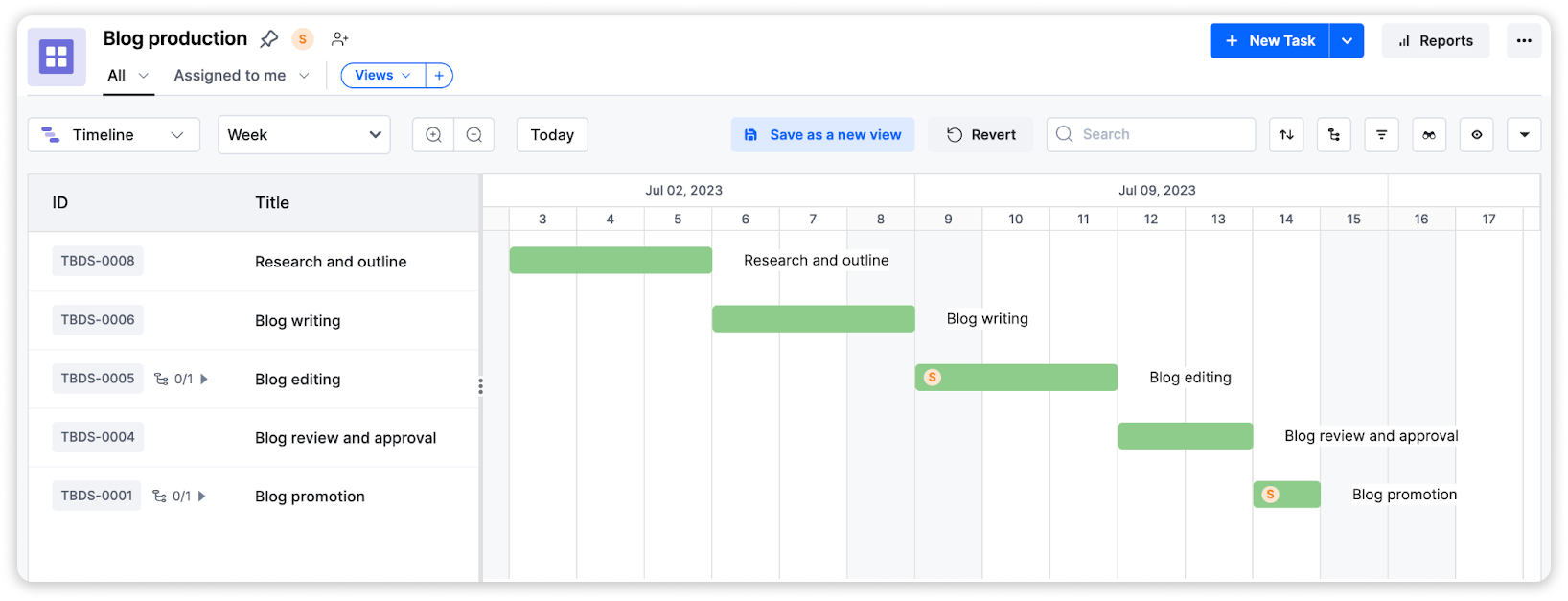
Week 1
- Research and outline the blog post (Assignee: Content writer)
- Write the blog post (Assignee: Content writer)
Week 2
- Edit the blog post (Assignee: Copyeditor)
- Review and approve the blog post (Assignee: Manager)
- Promote the blog post (Assignee: Marketing team)
Note
Statuses such as Yet to start, In progress, On hold, and Completed are just an example here — your board's statuses are fully configurable in its workflow. See Configuring statuses.
What the timeline view helps you spot
Because each item bar is positioned between its start and due dates, laying tasks out on a timeline makes a couple of things easier to catch early:
-
Sequencing risk — in this example, each step depends on the one before it. Seeing the bars laid end-to-end makes it obvious when a delay in one task — for example, the writer missing the end-of-week-1 deadline — pushes back everything downstream, so the team can adjust the schedule before it becomes a problem.
Important
The timeline layout doesn't track or enforce dependencies between items — it places bars purely by start and due date. Any sequencing insight comes from reading the layout, not from a dependency feature.
-
Crowded stretches of time — if several items land on the same assignee in overlapping windows, their bars visibly bunch up, which can be a cue to rebalance work or push out lower-priority items.
Note
For a dedicated breakdown of who's carrying the most work, use the Workload distribution widget on a board dashboard rather than the timeline layout.
Once the content is approved, the marketing team takes over promotion — shown on the timeline as the final bar in the sequence.
Other use cases
The same approach — converting tasks to items and laying them out against dates — works for any workflow with sequential handoffs and deadlines, such as:
- Event planning
- Product development
- Construction
- Manufacturing
- Agile project management