

Decision tables overview
Represent complex business logic as a table of conditions and results that workflows and apps can evaluate at runtime.
Decision tables overview
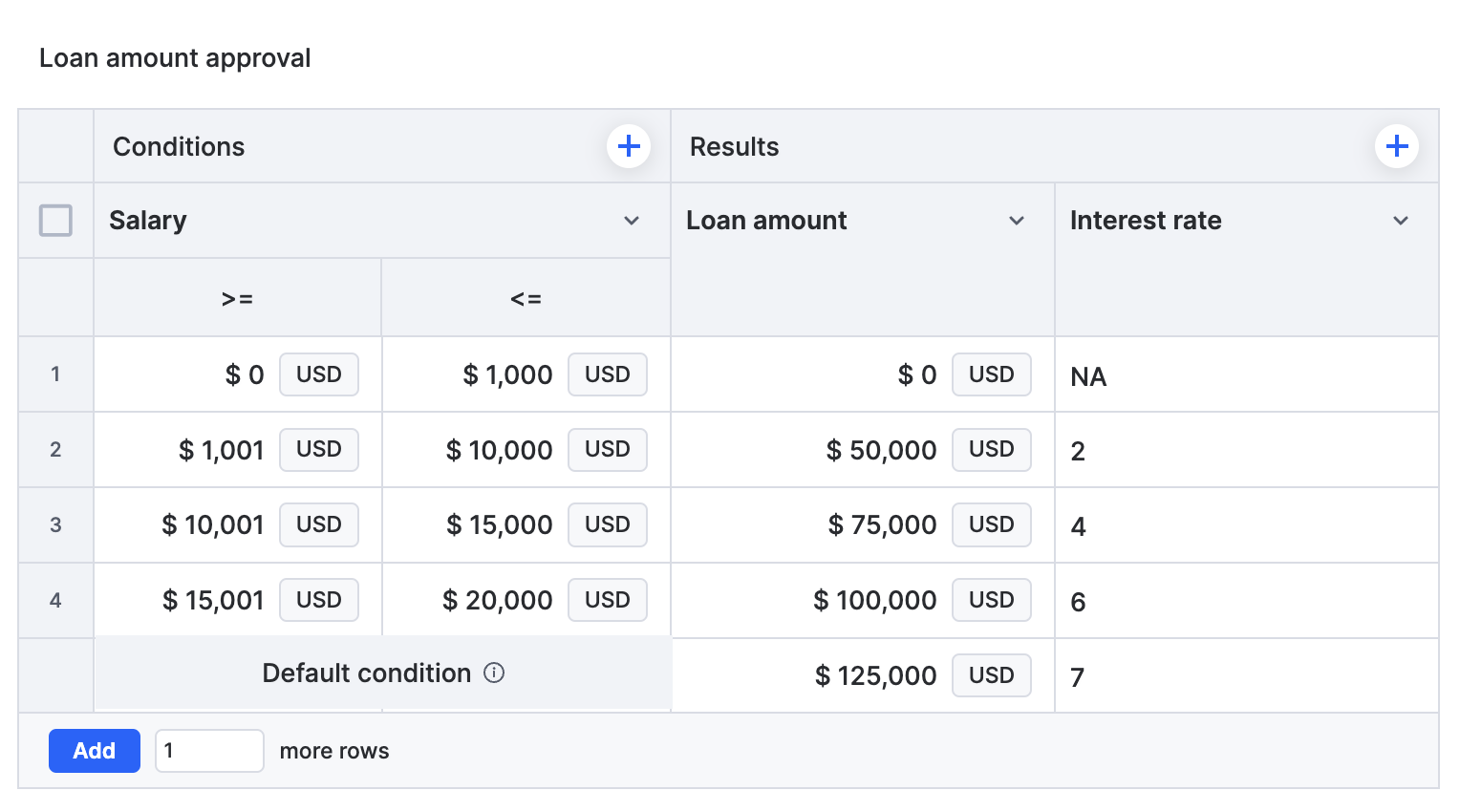
A decision table is a structured representation of business logic for decision-making. Instead of writing nested conditions in code or workflow branches, you organize your inputs (conditions) and outcomes (results) in a table that Kissflow evaluates at runtime.
Why decision tables?
When business logic involves many input combinations, evaluating conditions one by one is error-prone — especially when the rules change over time. Decision tables give you:
- A single place for complex logic — conditions and results live in one table instead of being scattered across workflow branches.
- Readability — anyone on the team can scan the table and understand the rules.
- Reuse — the same table can be evaluated from multiple places, so logic isn't copied and pasted.
- Business-user ownership — rules can be changed by the people who own them, without a developer rewriting code.
- Flexibility for changing data — adjust values in rows instead of restructuring logic.
How decision tables work
At runtime, input values are compared against your conditions row by row. Depending on the evaluation settings, the table returns the results of the first matching row, or aggregates results across all matching rows.
Limits
| Limit | Value |
|---|---|
| Conditions per table | 10 |
| Results per table | 5 |
| Rows per table | 50,000 |
| Values returned by Return all matched values | 100 |
| Rows added per CSV import | 1,000 |