
How-to
Short answer: Use the Scheduler by Kissflow trigger with a Daily schedule, then add the actions you need, such as Kissflow Process or Board actions.
Why it happens
Integrations normally run only when a trigger event happens in a connector. The scheduler gives you a time-based trigger instead, so the integration runs every day, week, month or year.
How to fix it
- Click + Create in the left navigation panel and select Integration.
- Search for the Scheduler by Kissflow connector and select Daily.
- Set Select hour of the day and Repeat frequency (in days). Under Stoppage based on, choose a specific end date or a number of occurrences. To test right away, set the hour at least 15 minutes ahead of the current time.
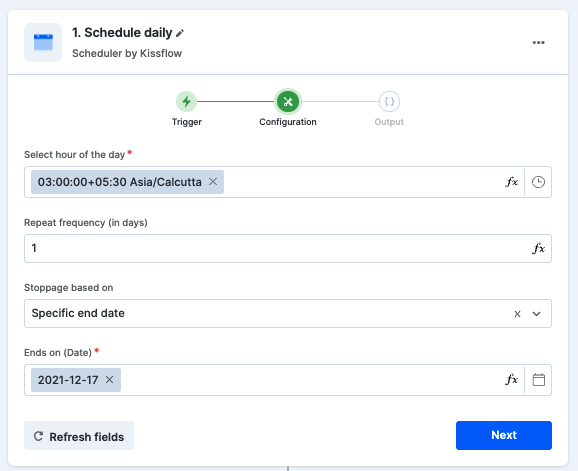
- Click Next, test the trigger, and click Done.
- Add your actions, for example Search an item from the Kissflow Process connector.
- In Search an item, don't map the scheduler output. Type a value directly in the search term, for example
a, and test. - Add a Loop step from the control connector over the search output.
- Inside the loop, add a condition and the remaining actions.
- Turn on the integration.
The schedule runs in the time zone from your My settings > Format settings. See Scheduler by Kissflow for the weekly, monthly and yearly options.
Example: recurring reminders
- Store the next due date for each record in a dataset.
- Set a daily scheduler to check for records that are due.
- On the Yes branch of a condition, create the follow-up item, for example a board item.
- Update the dataset record with the next due date.
If scheduled runs are skipped
If the integration skips some days, contact Kissflow support and share the integration URLs.
Important
Search an item retrieves up to 100 items, and a Loop step works only on the first 100 records. An integration can't schedule an automatic export of dataset or report files.