
Tip
Short answer: Open the process settings, go to Sequence numbers, and click Reset on the prefix. Enter the last number you want to keep, and the next item continues from there.
When to use this
Use this when a test item or a mistaken submission used up a number. For example, during testing a Process Admin submits an onboarding item by accident, and the next real hire would get the wrong employee code. Resetting the sequence puts the count back.
Set it up
- Open the process and click Manage > Settings.
- Open the Sequence numbers tab.
- On the prefix row you want to fix, click Reset. To fix every prefix at once, click Reset all.
- Enter the number to reset to. The next item gets that number plus one, so enter 0 to start again from 1.
- Click Reset.
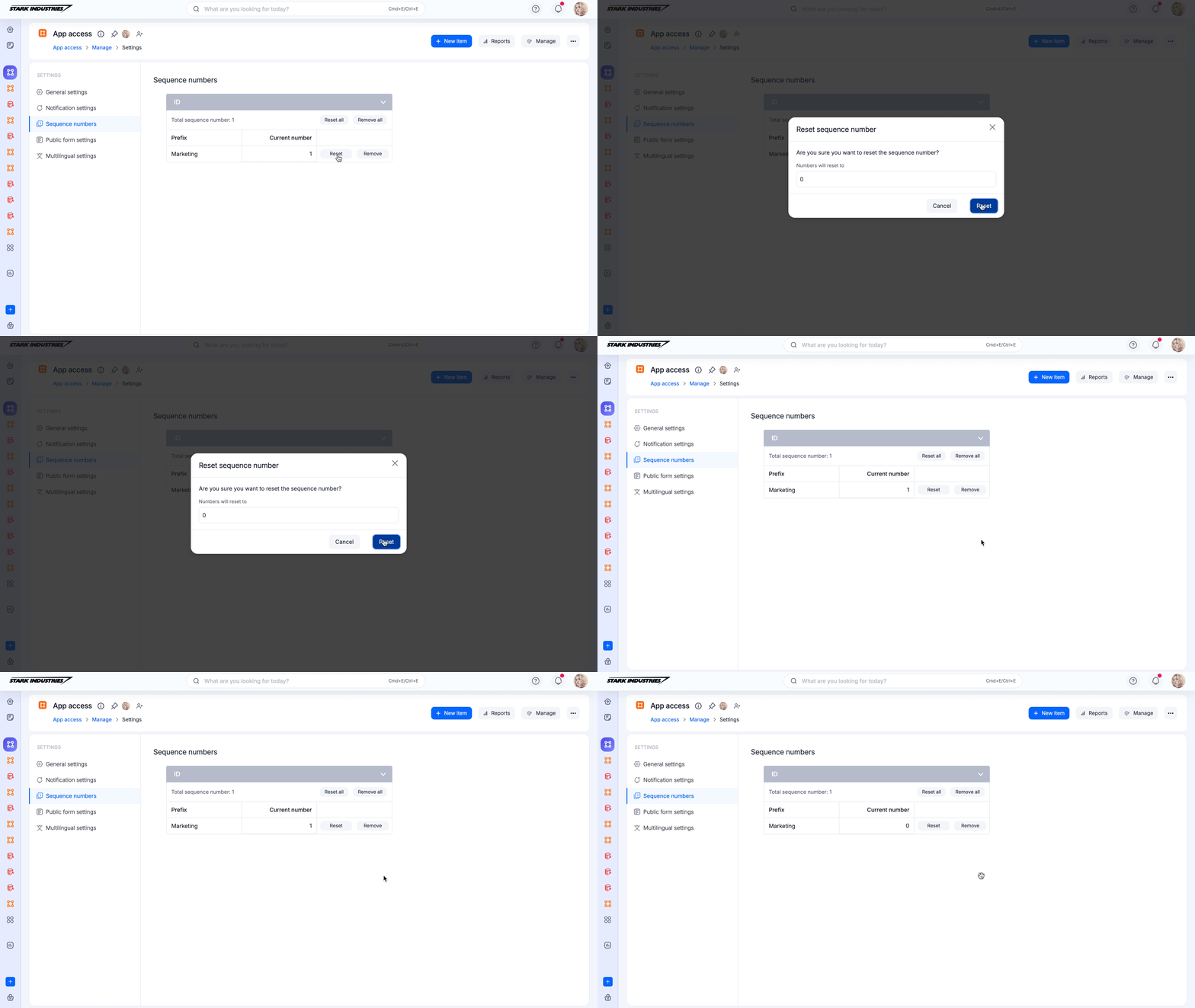
See process settings.
Tip
Reset keeps the prefix and changes its current value. Remove deletes the prefix, and its next item starts from 1. In a dataform, a sequence number is generated only when the form is submitted.