
Fix
Short answer: Assignees must open the item from Assigned items to see their actions and editable fields. To stop requesters withdrawing or reassigning, hide those initiator actions on each step in Permissions.
Why it happens
- Created by me shows the initiator's view: fields from the Start step plus initiator actions such as Withdraw and Reassign. In-progress items opened from there are read-only.
- Action buttons are set per step, separately for assignees and initiators.
- By default, initiators can reassign their in-progress items, including to themselves.
How to fix it
If an assignee can't act:
- Open the item from the Assigned items tab, or click the link in the assignment email.
- If fields are still read-only, a process admin should check the step's field permissions.
- Items sent back can be edited in place from Assigned items if the fields are editable at that step. You don't need to withdraw and resubmit.
To stop requesters withdrawing or reassigning:
- Click Manage > Edit process and open the Permissions tab.
- Select a workflow step, click Configure actions, then Configure initiator actions.
- Hover over Withdraw or Reassign and hide it.
- Repeat for each step where initiators shouldn't have these actions, then click Go live.
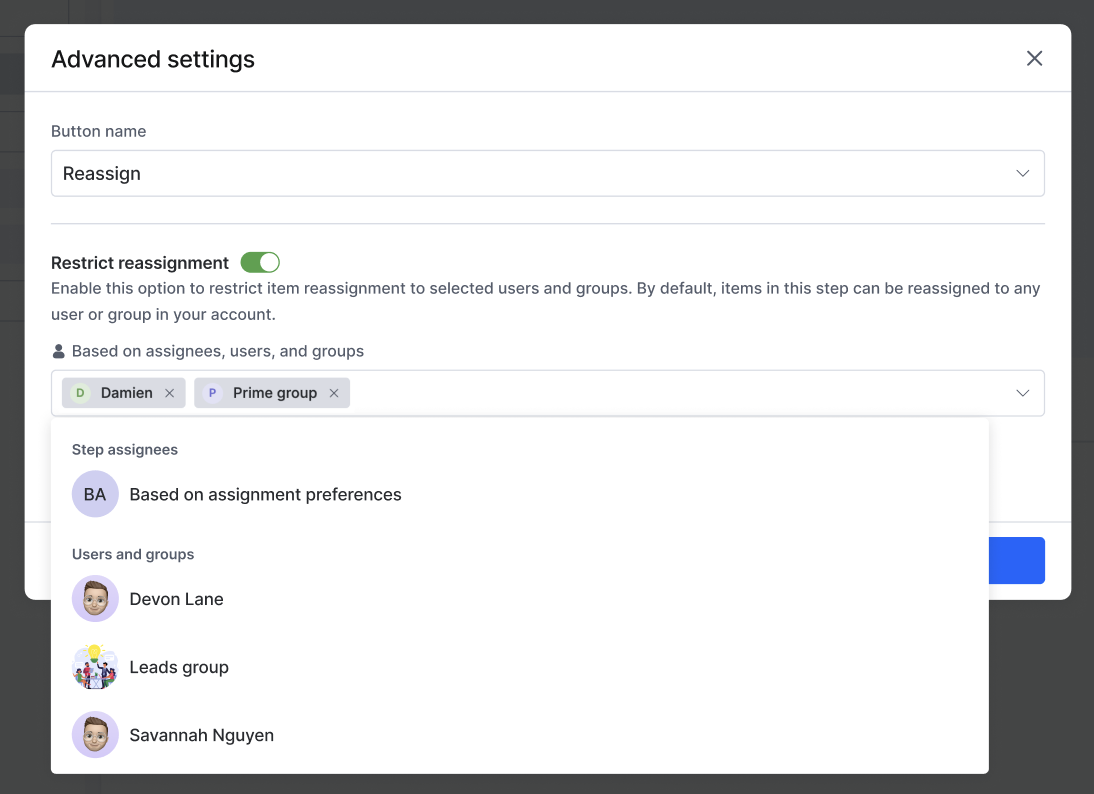
To limit who an assignee can reassign to, hover over Reassign in the step's assignee actions, open its advanced settings, turn on Restrict reassignment, and pick users or groups. Bulk reassignment isn't available at a restricted step. See configuring actions for process steps.
Process Admins can also reassign items and edit fields from Administration. See admin actions in a process.
Important
Restart for rejected and withdrawn items is always available to the initiator and can't be disabled.