
Short answer: Create an integration with the Webhooks by Kissflow trigger Catch a webhook (POST), copy the URL it gives you, and call that URL from the external system. The integration runs each time the URL receives a request.
Why it happens
Most triggers listen for events inside Kissflow. To start an integration from outside, such as a new row in Google Sheets or a step in Zapier or Make, the external system has to call Kissflow. The webhook trigger gives you a unique URL for that.
How to fix it
- Click Create in the left navigation panel and select Integration.
- Select the Webhooks by Kissflow trigger.
- In the Trigger dropdown, select Catch a webhook (POST) and click Next.
- Copy the webhook URL.
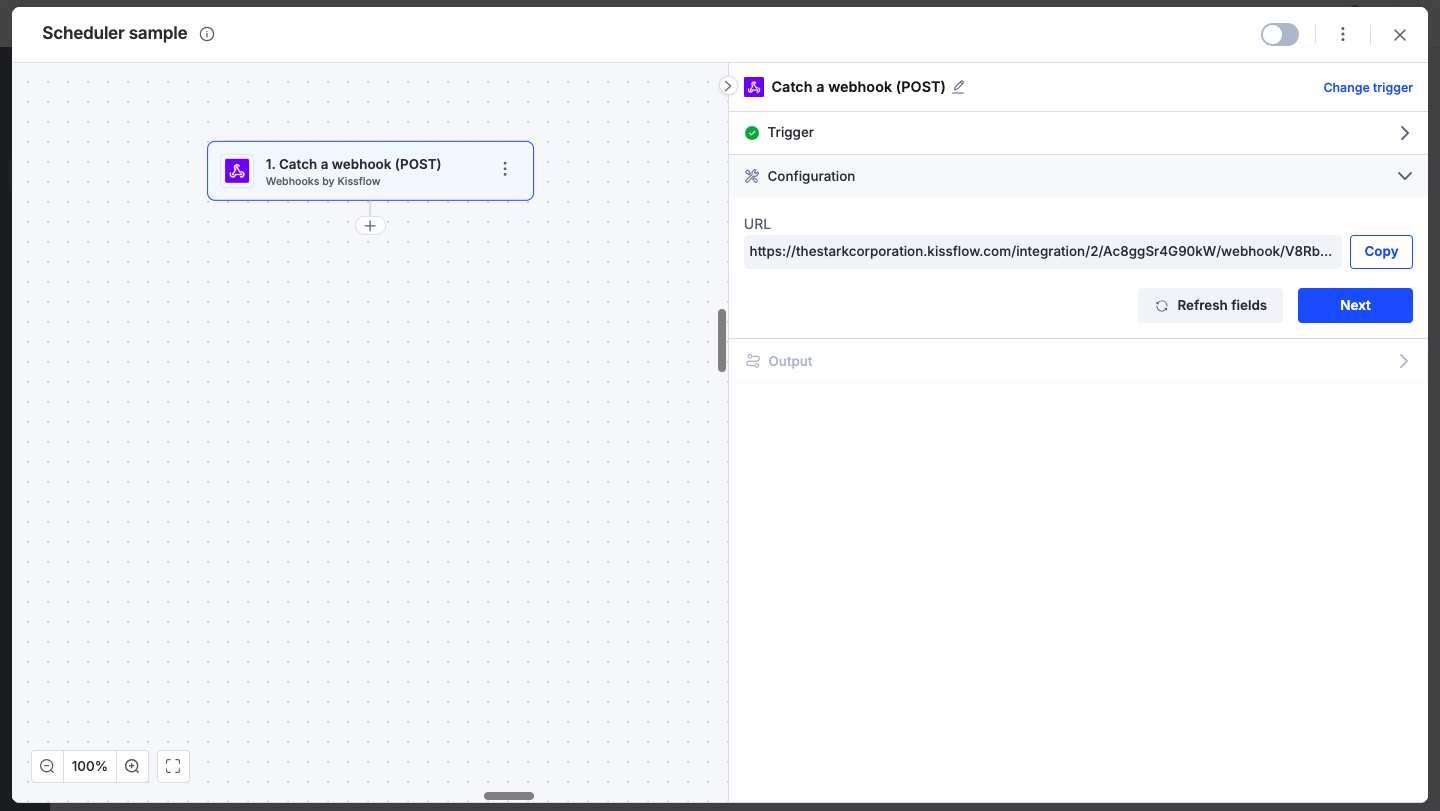
- In the external system, send a POST request to that URL. For example, use Google Apps Script when a new row is added to a Google Sheet, or a tool such as Zapier or Make.
- Send a test request from the external system so the trigger receives sample data.
- Add actions below the trigger, such as Create and submit a new item or Update an item, and map the webhook data.
- Turn on the integration.
The trigger only fires when the URL is called. See Webhooks by Kissflow.
If the caller needs a custom response
By default, the webhook returns 200 OK. You can change the headers, content type and body: open the trigger, select Response, and turn on Customize response. The response is sent as soon as the request arrives, before the actions run, so it can't include results from later steps. If the response uses a value from the request and a request arrives without it, the caller gets 400 Bad Request and the integration doesn't run.
Important