
Short answer: Put the visibility rule on the field you want to show or hide, not on the dropdown that controls it. Set edit rights per step in Permissions. A required field is checked only while it's visible, so pair "required" with a visibility rule to make it conditional.
Why it happens
- Visibility rules hide a field or section wherever the condition is true, including in completed items.
- Section permissions take precedence over field permissions. A field set to Editable stays read-only or hidden if its section isn't editable.
- Permissions are set per step, not per user. You can't make a field read-only based on another field's value.
- Required fields are validated only when visible. Required table columns are checked only on rows that exist.
- A field hidden through step Permissions isn't used by visibility rules on other fields.
How to fix it
To show a field only for one dropdown value:
-
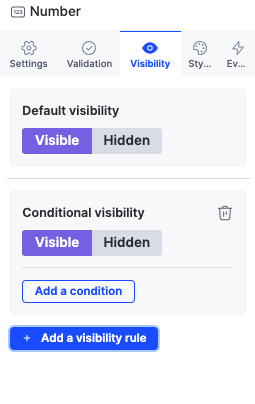
Open the target field or section and go to Visibility.
-
Set Default visibility to Hidden.
-
Click Add a visibility rule, then Add a condition, for example Dropdown is equal to "Travel".
-
Give each field or section its own rule when different values show different fields.
If a field won't edit at a step:
- In the process editor, open Permissions, select the step, and set the field and its section to Editable.
- For sent-back items, make the fields editable at the step the item returns to.
To make a field required only in some cases:
- Mark the field required.
- On the same field, set Default visibility to Hidden and add a visibility rule whose condition checks the controlling field. It's enforced only when shown.
To require at least one table row, set the table's minimum rows validation to 1, then turn on required for each column that must be filled.
To require at least one of several fields, add a helper text field with if(isBlank(F1) && isBlank(F2) && isBlank(F3), "Enter a value in one of the fields", "OK") and give it an Equal to "OK" validation.
If a visibility rule needs a helper field, don't hide the helper in Permissions. Put it in its own section and hide that section instead.
Important