
Fix
Short answer: Add the filter in Edit as an advanced filter and save the report. Filters you apply while viewing a report are temporary and apply only to you.
Why it happens
- A filter added from the report's Filter action is temporary. It isn't saved for people the report is shared with.
- Only filters saved in the report's configuration are part of the report.
How to fix it
-
Open the report and click Edit.
-
Under DATA FILTER, click Add advanced filter > Add a filter.
-
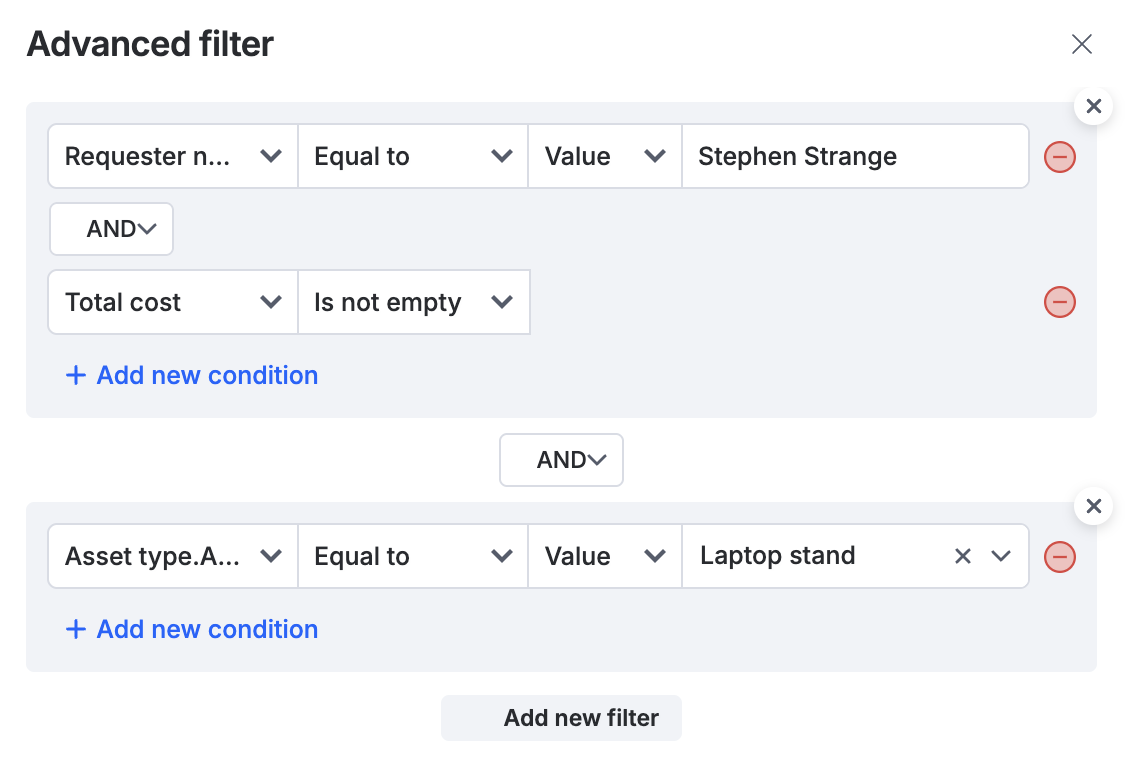
Choose the field, operator and value. Add more conditions with AND or OR as needed.
-
Click Apply, then save the report.
-
Export again and check that the file contains only the filtered rows.
If the total count or show/hide options don't match the filter, report it to Kissflow support with the report URL.
See tabular reports.
Important
By default, people you share a report with can search, filter, export and show or hide fields, but they can't edit it, unless you also grant edit access when sharing. Only a saved filter changes what they see by default.