
Short answer: Use substring() in the Prefix of a Sequence number field. Each new hire then gets a code that starts with the first letters of their department, such as Fin-001 or Mar-001.
When to use this
Use this when you onboard employees, or create any record, through a Kissflow form and want IDs that show where the record belongs. Each distinct prefix keeps its own running count, so every department gets its own sequence. The codes stay consistent and nobody has to type them by hand.
Set it up
-
Open the form editor and add a Sequence number field.
-
In the Settings panel, give it a Name and Field ID.
-
In Prefix, enter a formula that reads the department field:
Employee_department.substring(1,3)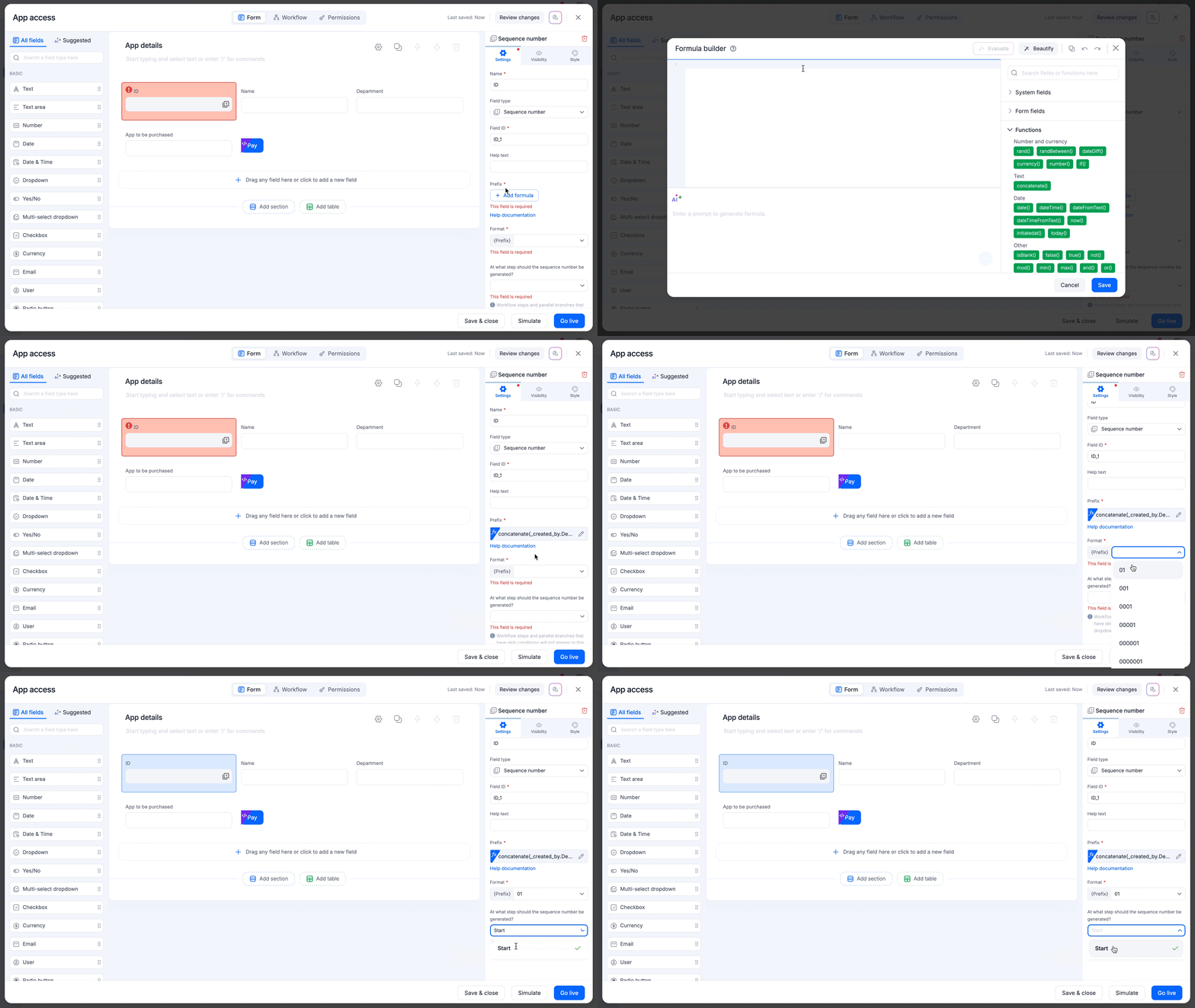
substring(1,3)returns characters 1 to 3. Finance becomes "Fin", Marketing becomes "Mar", and HR stays "HR". -
Under Format, choose how many digits the running number uses.
-
For a process, choose the step where the number is generated, then click Go live.
To add a separator, wrap the formula: concatenate(Employee_department.substring(1,3), "-").
See Sequence number and text expressions.
Tip
concatenate(_created_by.Department, "-").